
The PC left in a hotel room: how FrontierStack would have caught it
Published 2026-10-16
According to a report this week in Tokyo Reporter, citing NHK, two people checked into a hotel in Kobe in August last year, connected a computer to the room's Wi-Fi, hid it in a corner of the room and checked out. Police believe an accomplice controlled it remotely. It was used to send at least several hundred thousand phishing emails, which led victims to fake sites built to collect credit card details, and the emails went out through the hotel's internet connection, hiding where they really came from. The hotel consulted the police, who found the computer still connected. The pair have since been indicted.
None of this needed a sophisticated attack. Guest Wi-Fi exists to put strangers' devices online, and that is all it did. What was missing was someone watching what one of those devices was doing with the connection. That is a monitoring gap, and a hotel, serviced apartment, coworking space or office can close it.
FrontierStack would have caught it. A computer sending mail the way spam bots do, straight to other people's mail servers, sets off Rogue Device Watch within ten minutes of its first batch, and the alert names the device. Whatever way it sent its mail, a computer still on the guest Wi-Fi a week after its owners checked out is flagged by the guest-network check.
What a hidden mail sender looks like from the network
- It sends email straight to other people's mail servers. Phones and laptops send mail through their own provider, over the encrypted ports 587 or 465, or through webmail. They don't connect to dozens of different mail servers on port 25. A device on a guest network doing that is the signature of a spam bot.
- It never leaves. Guests come and go. A device that stays on the guest network for weeks, through every check-out, isn't a guest.
- Your address ends up on blocklists. Mail providers report spam sources to lists such as Spamhaus and SpamCop. The listing names your public IP address, and it can stop your own legitimate email, booking confirmations included, from being delivered.
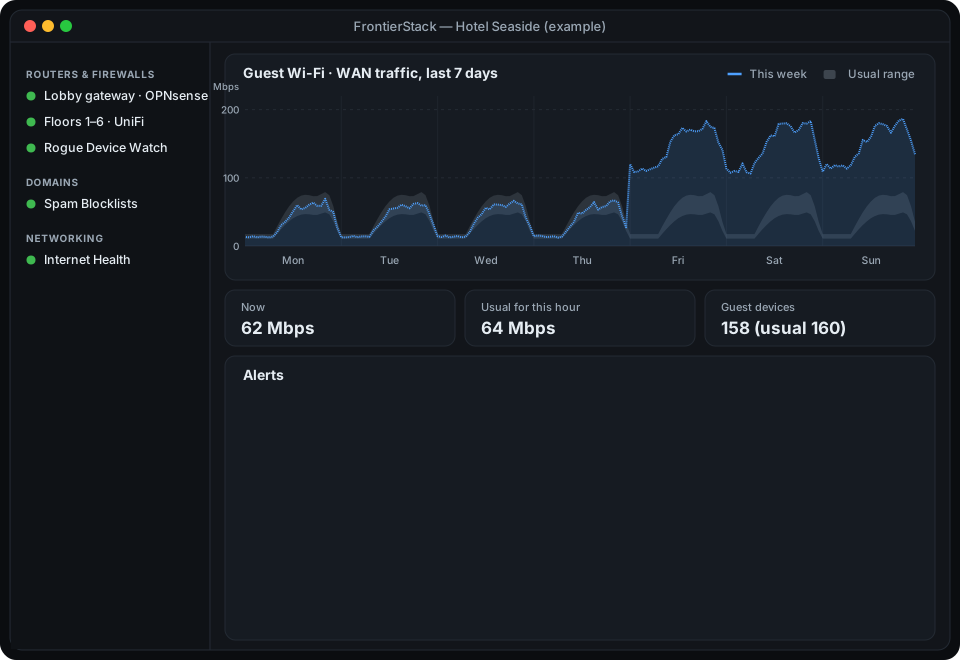
- The connection gets busier. Hundreds of thousands of messages means steady traffic around the clock, possibly from a room that is empty.
How FrontierStack catches it
FrontierStack 2.6 adds a check for each of these signals. They work from the router and the internet, so nothing is installed on guests' devices, which you couldn't do anyway.
- Rogue Device Watch (Full Fleet) reads the connection table on your OPNsense, pfSense, MikroTik RouterOS or OpenWrt router every ten minutes. When a device that isn't one of your approved mail servers contacts five or more different outside mail servers on port 25 within an hour, it raises an alert that names the device's IP address, MAC address and hostname from the router's DHCP leases. Mail arriving at your own mail server never counts, and the threshold is adjustable.
- The same pane can flag a device that never leaves. Mark which networks are for guests, and a device that stays connected for more than seven days (adjustable) raises an alert. Smart TVs, room controllers and other fixtures can be acknowledged once so they stay quiet. This check is off until you turn it on.
- Spam blocklist checks look up your domains, your mail servers and your routers' public IP addresses on the major blocklists, on a schedule you choose. A listing raises an alert with a link to that list's lookup and removal page. When a list refuses to answer, the result is shown as inconclusive, never as "listed".
- Router usage alerts learn each router's normal traffic for every hour of the week. A sustained spike raises one alert. Several days well above the four-week median raises another, titled "possible unauthorised use", which also compares the number of connected devices with normal.
- Scheduled speed tests, if you turn them on, catch the slower version of the same story. When a line tests well below its usual speed for a week, compared like for like, either the line has a fault or something is using a lot of it.
Each check is enough to raise the alarm on its own, and together they point at the same network.
Prevent it: close the door first
- Block outbound port 25 from guest networks. Guests don't need it; only your own mail server does. On OPNsense and pfSense, Rogue Device Watch reads your firewall rules and tells you whether the guest network can still reach port 25, with a link to the right page in the router. It doesn't change the rules itself.
- Keep guest devices apart. Turn on client isolation on the guest Wi-Fi so one guest's device can't reach other guests, your staff network or your systems.
- Change the guest Wi-Fi password regularly. A password that never changes is effectively public after a few months. Change Wi-Fi Password (Full Fleet) gives one network a new password on every router and access point that broadcasts it, in one pass: OpenWrt and MikroTik routers and UniFi consoles directly, and everything else as a checklist with a link to its web page. It also shows a QR code for the front desk. A new password also cuts off any device that only knows the old one, including one hidden behind a wardrobe.
- Watch your public address. Turn on the blocklist check for your routers' public IP addresses. Weekly is plenty.
When the alert fires
- Read the alert. It names the device's internal IP address, its MAC address and, where the router knows it, its hostname, and says how many outside mail servers it contacted.
- Find the room. Your access point controller's client list shows which access point the device is connected to, which narrows it to a floor or a wing. On a wired network with managed switches, FrontierStack's Network Path pane can find the switch port that a MAC address is on.
- Cut its access, not its power. Block the MAC address on the router or access point, and change that network's Wi-Fi password. Leave the device where it is and speak to the police before anyone handles it. In Kobe, it was the hotel's call to the police that led to the computer being found.
- Clean up your address. Once the sending has stopped, the blocklist results link to each list's removal page. Many lists remove an address once the spam has stopped, some automatically and some on request.
- Approve legitimate senders. If the sender turns out to be a real mail server, such as a property management system that sends confirmations itself, add it to the approved list so it stays quiet.
What you need
Rogue Device Watch and Change Wi-Fi Password are part of FrontierStack Full Fleet. Spam blocklist checks, router usage alerts and scheduled speed tests are included in Standard. The mail-sender check reads OPNsense, pfSense, MikroTik RouterOS and OpenWrt routers; on OPNsense, the API key needs permission to view firewall states, DHCP leases and firewall rules.
The manual covers each part in detail: Rogue Device Watch, spam blocklists, router usage alerts, scheduled speed tests and changing a Wi-Fi password across many routers.
Run it from your Mac.
FrontierStack installs, monitors and secures services on this Mac and on linked servers; and keeps your passwords and keys out of any AI's sight.
Download FrontierStackApple notarized · Safe & secure · macOS 13 Ventura+