FrontierStack monitors and manages the servers, services and devices you run. Use one Mac to check health, control remote machines over SSH, review security, and fix problems without keeping a row of Terminal windows open.
Now availableFrontierStack 2.0 is here. Full macOS 27 support, with Apple Intelligence powering the AI Administrator. What's new →Apple notarized · Safe & secure · macOS 13 Ventura+
FrontierStack starts with read-only checks, asks before it changes anything, and keeps credentials on your Mac. Monitors run on each host, so they keep watching while your Mac sleeps. Enfour has run production services on Apple hardware since 1992. That history is why the app is cautious about changes and fussy about receipts.
Ask a question in plain English. FrontierStack runs checks against live system state, explains what it found, and puts any repair behind an approval card. It works on this Mac and on linked servers over SSH. On macOS 27 you can run it entirely on Apple Intelligence; the on-device model needs no API key and never leaves your Mac. FrontierStack AI is free for now, and any cloud provider or local Ollama or LM Studio model works too.
Works with ChatGPT · Codex · Claude · Grok · Gemini · Cursor · OpenClaw · Hermes · Paperclip · Buzz · Amp · Xcode and any MCP client.
A coding agent or coordinator can request infrastructure work without receiving passwords or private keys. FrontierStack returns the relevant tools, applies local rules, asks you to approve changes, checks the outcome and records what happened.
Use MCP and the CLI today. A2A, MCP Tasks and CloudEvents are opt-in previews for coordinators that support them.
FrontierStack finds the permitted tools for the current job; it does not load hundreds of unrelated tools into the model context.
App Lock, caller scope, approvals, destructive-data protection and the audit trail remain local. A prompt, agent card or chat message cannot widen them.
FrontierStack in agent teams How it works with each platform Read the setup guide
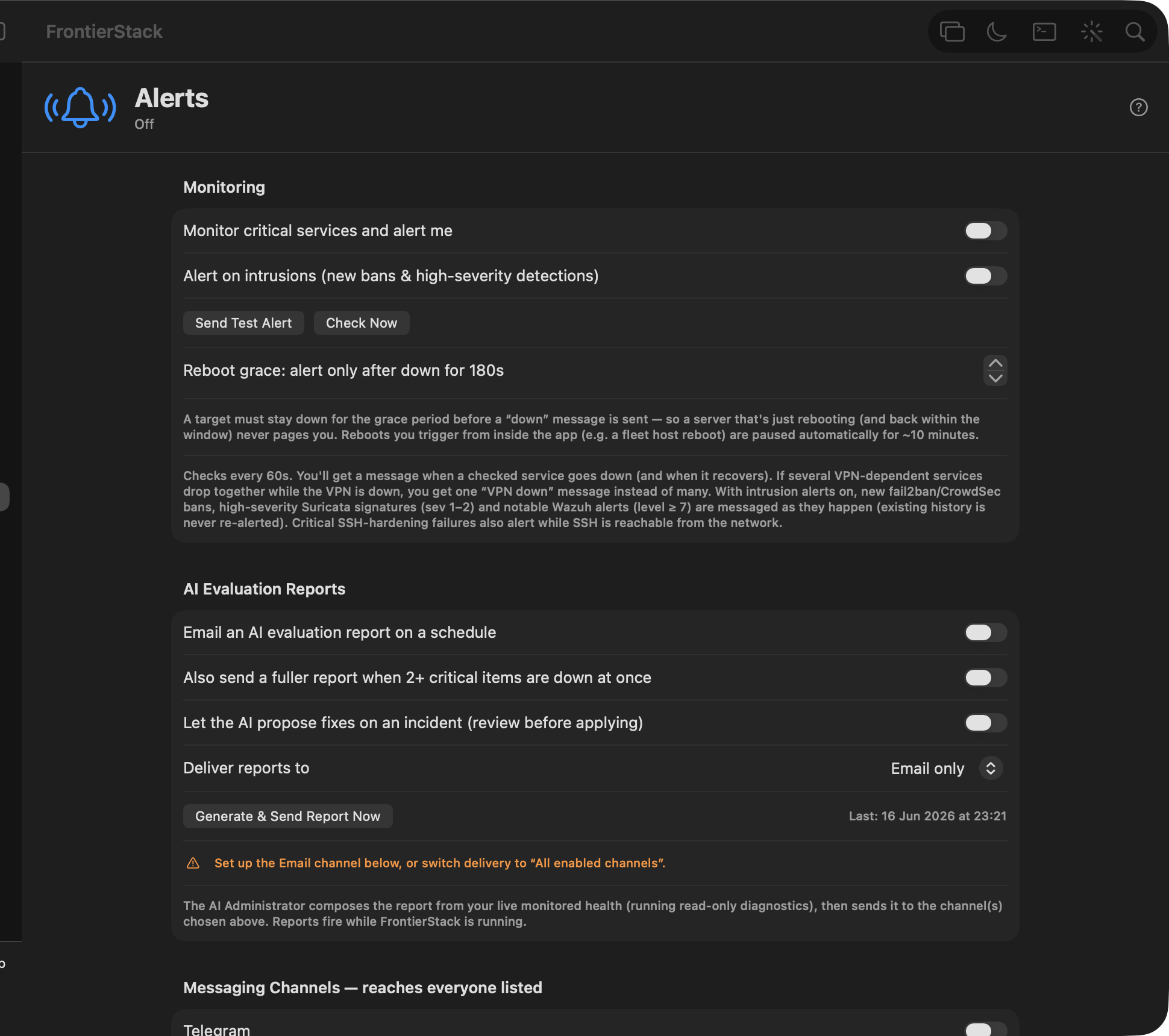
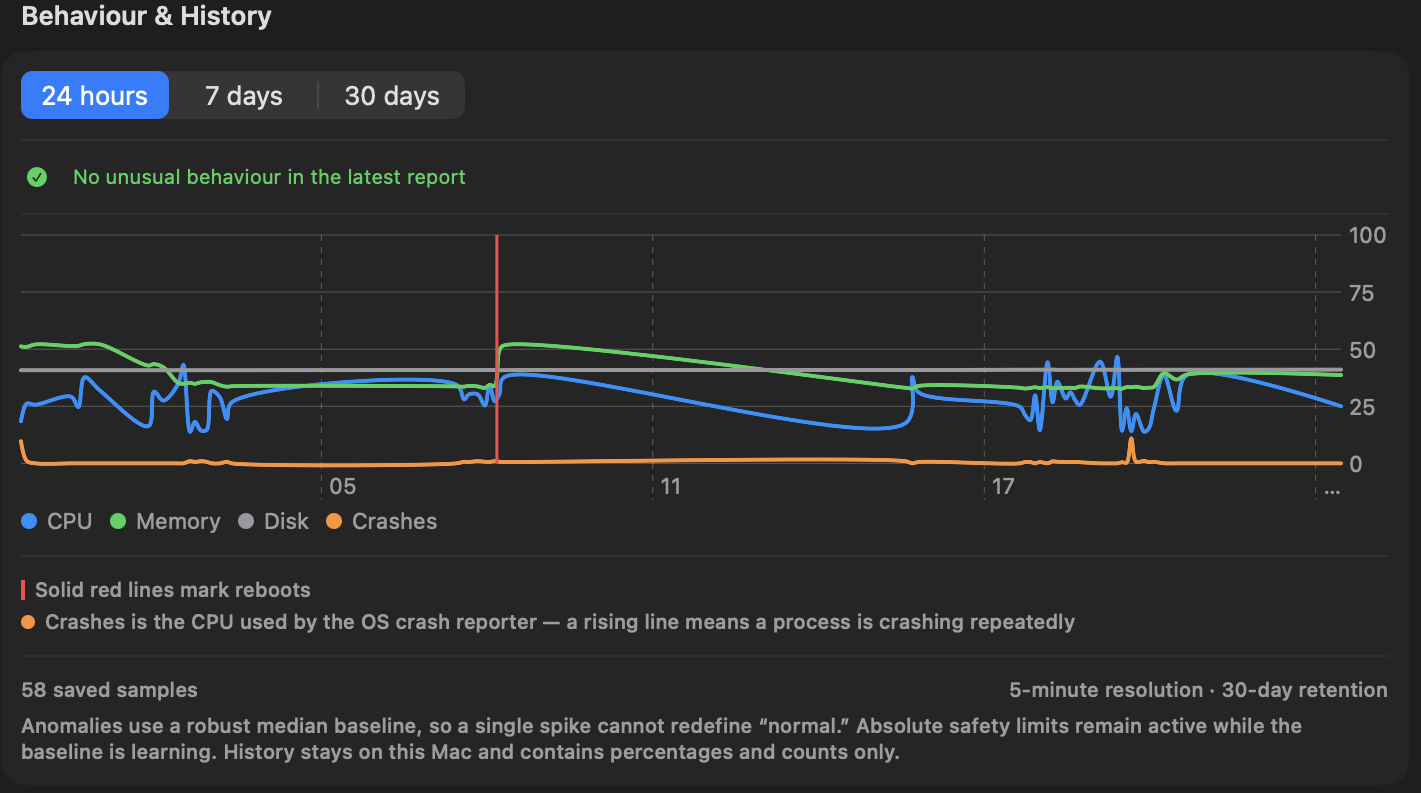
The app keeps the measurements, alerts and repair history together, so you can see what happened before you act.
A separate window holding only your servers and the devices that report live state. Tiles carry CPU, memory, disk, network, temperature, power and GPU with sparklines; select one for processes, services, containers, files, ports, a terminal and power control. Layouts fit a Mac fleet, a cluster, mining rigs, or the network and power gear. Everything is reachable from the keyboard.
One sheet, reached from the Docker pane or the Server Activity window, creates a container on this Mac or on a linked server over the SSH connection you already have. Presets cover plain images and every self-hostable service FrontierStack can run as a single container, so the same thing you install locally can be stood up on a server. Ports bind to localhost unless you say otherwise, secret values are hidden, and the exact docker run line is shown before anything happens.
nginx, PostgreSQL, MySQL, Redis and a throwaway shell, plus n8n, Vaultwarden, Checkmk and the rest of the single-container services.
Every published port starts bound to 127.0.0.1. Turn that off deliberately when a service should be reachable from the network.
The command is shown before it runs, secrets redacted, and the pull and run output comes back in the sheet.
New integrations let bots help with server work without handing them your server credentials.
FrontierStack detects Grok and can add its Keychain-backed MCP bridge. Local workflows start read-only; cloud bots need network access to be enabled deliberately.
Send alerts to Slack and export a credential-free Slack or Teams handoff recipe. FrontierStack keeps approvals and server credentials on the Mac.
Install or connect Buzz, monitor its hosted or self-hosted services, and export a scoped Buzz-style team recipe for people and AI agents.
Detect and configure Hermes Bot Mode, Amp and DeepSeek Harness Alpha, then see T3 Code workers and agent jobs across linked servers.
Progressive LAN discovery identifies Macs, Windows PCs, Apple TV, routers, printers and more. Focused fingerprinting can add LLDP/SNMP checks, preserve known names and flag AnyDesk or Tailscale support.
See Strix installation, version, API status, scan progress and findings alongside connected repositories, domains and CI providers; then launch or repeat scans from FrontierStack.
Inspect channel usage, filter crowded network lists, pin the connected network and keep location-aware device knowledge for faster, more accurate future scans.
Network Check and device discovery are free without pairing. A licensed desktop unlocks live fleet health, incidents, power recovery, direct helpers, SSH and administration.
See the last 30 checks, measured response time, honest 24-hour, 7-day and 30-day uptime, and every outage or recovery. Private iPhone and Lock Screen widgets keep the essentials visible without exposing credentials.
Added support for hardware key securing of FrontierStack. Compatible with YubiKey, Google Titan or FEITIAN FIDO2 key. Add up to three backup keys; compatible USB-C, Lightning and NFC models also work with the iPhone and iPad app. (Fleet license only)
Your SaaS plan may bill in dollars, your registrar in euros, and your licence in yen. FrontierStack records each amount as charged. It converts currencies only when you ask for a combined total.
Spend & Billing records AI plans, hosting, SaaS, domains and free-text costs such as "Acme server rentals, €20/month." Totals use editable, dated exchange rates that you can refresh from the ECB. Most service panes have a Plan & Cost row, so you can record a charge while looking at the service.
Set a monthly budget and FrontierStack raises an alert at 80% and 100%; covering every subscription, in any currency, even services with no API. Connected AI accounts carry their own monthly limits against auto-synced spend, DigitalOcean, Vultr and Linode report month-to-date charges with thresholds of their own, and a billing-health watcher flags failed payments before a service goes dark.
Sales Channels adds up today's payments from Square, Stripe, PayPal, Shopify and other providers. It keeps separate totals for each currency. Store Health converts revenue and ad spend only when it calculates net income and ROAS.
Use Network Check and local device discovery free without pairing. Pair with a licensed FrontierStack desktop for live health, incident alerts, smart reboots, power and UPS status, direct helper monitoring, SSH and administration; over LAN or Tailscale.

FrontierStack meets your infrastructure where it is; across generations, operating systems and the growing collection of devices around them.
Keep valuable Apple server hardware useful. Link an Xserve or an older Mac running macOS Server over SSH, then monitor services, inspect logs, run diagnostics and manage it from your current Mac.
Bring Macs, Windows PCs and servers, Linux and BSD hosts, Raspberry Pi systems and virtual machines into the same fleet. Discover them, identify what they are, then monitor and operate them over the best available connection.
Monitor and control SwitchBot, Zigbee and HomeKit-exposed devices, cameras, sensors, smart plugs, UPS units and network gear. Pin them to Places, automate responses and use remote power to recover a server that SSH cannot reach.
Two editions, one app; pick the side that sounds like you.
One Mac, your own stack.
Many machines, serious infrastructure.
From a single laptop to a fleet of macOS and Linux machines; provision, monitor, secure and automate.
Apache/Nginx, MySQL/Postgres, PHP, virtual hosts, TLS; create a site and DNS in one wizard.
Create a Docker container on this Mac or on any linked server from one sheet; image, ports (localhost-only by default), volumes, environment with secret values, restart policy; with the exact docker run line shown before it runs. Presets cover plain images and every self-hostable service FrontierStack can run as a single container.
Every server and live device at a glance in its own window; tiles with CPU, memory, disk, network, temperature, power and GPU sparklines; layouts for Macs, clusters, mining rigs or network & power gear; and per-server tabs for processes, services, Docker, files, ports, logs, an in-window terminal, and power (reboot, plug/PDU/KVM, Wake-on-LAN). Uses the FrontierStack monitor where installed, plain SSH elsewhere.
One Mac drives every linked server: run commands, audit, deploy, compare config drift across the fleet.
Running a newer macOS on an old Intel Mac via OCLP? FrontierStack detects it, checks the boot chain (firmware → OpenCore → macOS → root patches), backs up the EFI, and answers "Safe to update macOS?"; so a remote Mac never gets stranded at a boot picker. The AI Administrator knows too, and won't install a macOS update there until it is safe.
Reinstall a server without a USB stick. Keep installer ISOs in one library and mount one as a virtual CD through Redfish (Dell iDRAC, HPE iLO, Lenovo XClarity, Supermicro), a PiKVM, or a Proxmox VE VM's CD drive, then boot it once and restart. A built-in media server answers only private and Tailscale addresses, at unguessable URLs, and switches itself off. There is an iPXE network-boot menu with ready-to-copy DHCP settings, and for Macs, which can't boot an ISO, FrontierStack downloads Apple's full installer over SSH, runs an upgrade or erase-install, and can turn on Content Caching.
Connect a Proxmox VE cluster or node with an API token and see quorum, every node's CPU, memory, disk and uptime, every VM and container, and storage usage. Start, shut down or reboot guests (hard stop and reset after confirmation). Nodes appear as tiles in the Server Activity window, and Alerts warns when the API stops answering, a node goes offline, quorum is lost or storage passes 90%.
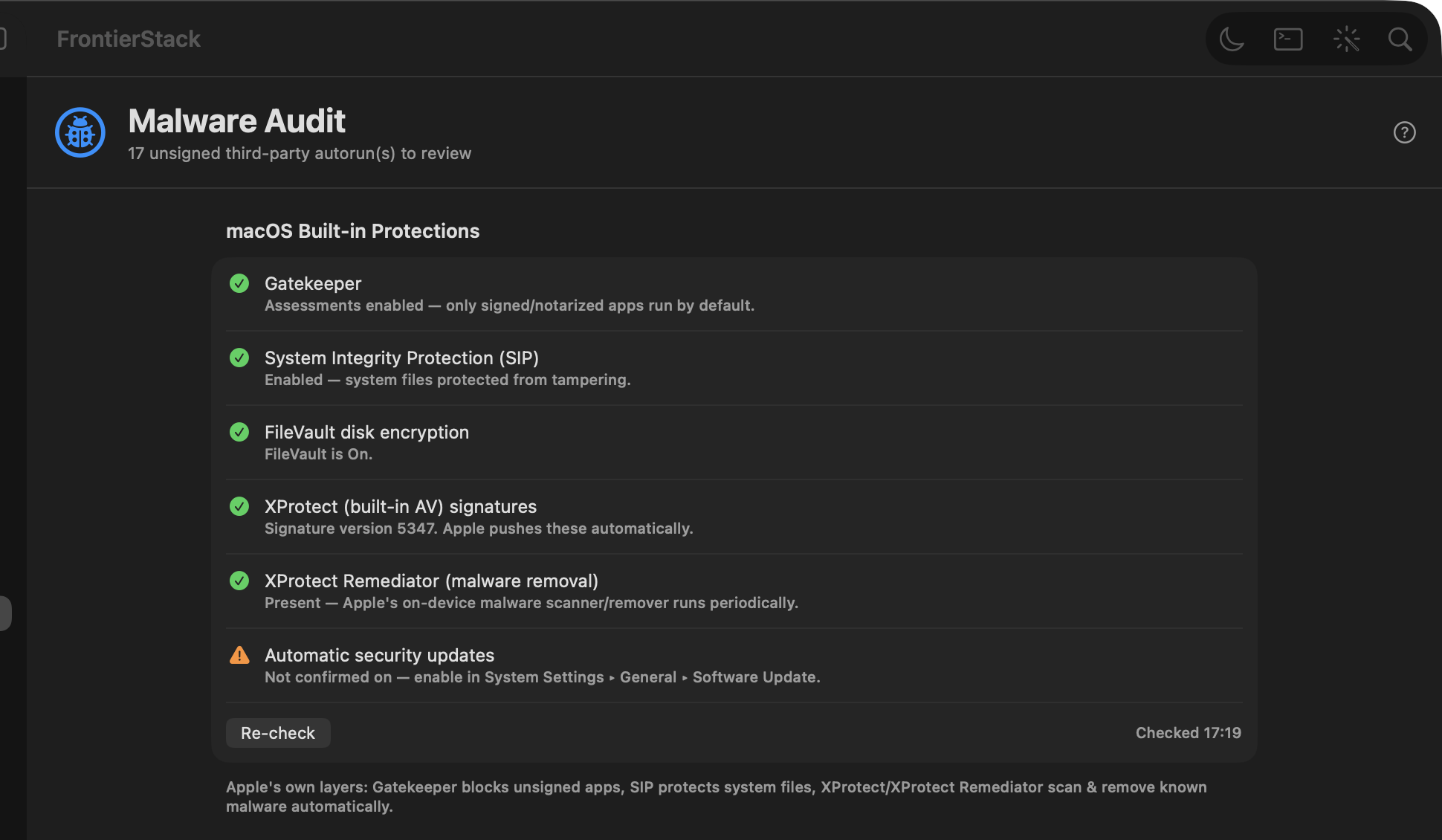
macOS firewall, pf, fail2ban, open-ports watch, a Malware Audit pane (XProtect, ClamAV, YARA, VirusTotal), EDR fleet and a sandboxed AI Security Audit (exploitable-only, code or infrastructure).
Ask FrontierStack's built-in AI to inspect a problem, or connect Grok, Codex, Claude Code, Cursor and other MCP clients. FrontierStack keeps credentials on the Mac, limits what each caller can do, asks for approval, and records the result. See agent workflows.
Every recurring charge you have; AI plans, cloud and hosting, SaaS tools, domains and certificates; as weekly, monthly or annual, grouped by category with monthly and annual totals. Presets cover the common services and you can type any name, so a subscription with no API is tracked exactly like one FrontierStack can query. It also watches your paid services for failed payments and warns you before one stops working.
See worker health, detected runtimes, active jobs and persistent terminal sessions. The iOS app shows limited agent activity without copying prompts, transcripts, terminal contents or credentials to the phone.
Your self-hosted and SaaS services together; install local ones or connect cloud accounts, 500+ in all, in one sidebar tailored to your use-case.
Network Check and Bonjour device discovery are free without pairing. Pair with a licensed FrontierStack desktop for fleet health, incidents, power recovery, direct helpers, notifications, SSH and controls over LAN or Tailscale. Learn more.
A Channel Manager for vacation rentals; connect Hostaway, Lodgify, Guesty, Cloudbeds, Beds24 and more (or a custom AppSheet app) for live reservations, revenue and occupancy, sync OTAs (Airbnb, Booking.com, Vrbo, Expedia…) by iCal, and schedule cleanings with Turno.
Access points, cameras and door controllers have no power button; their switch port is it. See every PoE port's state, class and draw, watch the switch's power budget, and power-cycle a port to reboot a wedged device without a trip to the cabinet. Works with any managed switch supporting the standard PoE MIB (RFC 3621).
Run your own ZeroTier controller instead of ZeroTier Central; FrontierStack is the local admin UI it doesn't ship with: member approval queue, routes and IP pools, a flow-rule editor with its own compiler, security audit, Prometheus metrics and a warm standby. Administered over SSH against the controller's loopback API, so nothing is exposed.
Control SwitchBot, Zigbee and HomeKit-exposed devices, watch them on the Places board, and link a SwitchBot Smart Plug to a server to power it on/off; or power-cycle a hung machine when SSH won't answer. When a wedged server's database is still reachable, FrontierStack can even flush and cleanly shut it down over its own connection first, so a power reset is safe.
Use any local Markdown folder as the source of truth, with Obsidian as an optional editor. Perplexity works as a cited web-research provider, while Projects and Brain receive a separate redacted export that you review and opt into.
One place for every domain; from local & remote Apache vhosts, Cloudflare zones and the registrar monitor. Check DNS, HTTP, SSL/expiry, see which server serves it and whether it's a Cloudflare zone, and run an AI SEO audit (score + fixes) on any site.
Monitor APC, Eaton, CyberPower and Vertiv UPS devices over macOS USB, NUT or apcupsd. See runtime, load, watts and voltage, set charge, runtime and load warnings, and detect battery-service or communication faults.
Query any OID or apply a generic SNMP template (System, Interfaces, Host Resources, Printer, UPS, Synology, QNAP, APC) on any device; read switches, NAS, printers, UPS and more.
S.M.A.R.T. drive monitoring (with deep smartctl attributes; temperature, reallocated/pending sectors, predicted failure), AppleRAID set health with degraded/rebuild alerts, per-volume free space, and Time Machine freshness; all wired into the alerts engine.
On-host health checks for MySQL & PostgreSQL; liveness (won't-start / wedged), replication, and a corruption early-warning that flags trouble before a table goes bad; plus AI-assisted recovery and alerts that keep working even when your Mac is asleep or offline.
Temporarily expose a local dev server (localhost:PORT) for a debug or preview session; via a Cloudflare Quick Tunnel (public, no account), Tailscale serve/funnel, or a LAN forwarder; with an auto-expiry. The AI Administrator can open and close sessions too, over MCP.
Pick a preset and the app shapes itself to how you work.
A reviewed, step-by-step path through hardware, macOS, networking, remote access, backups, security and monitoring. Mac mini server guide →
Spin up many local sites without juggling multiple Terminal windows, save & schedule your scripts, and target Docker or cloud. Web dev on a Mac →
An AWS control panel on your desktop; S3, EC2, RDS, Route 53, budgets and IAM keys, plus your EC2 boxes over SSH. AWS dev on a Mac →
Manage containers and Compose projects; start/stop, logs, exec, prune; on Docker, OrbStack or Apple's runtime, local or remote. Docker on a Mac →
Move sites, databases, PHP settings and WordPress onto a modern Homebrew stack. See migration guides →
Replace a stack of subscriptions with services you own and run. How it works →
Sourcing, POD, shipping, inventory and profit tools for commerce on a Mac. Drop-shipping →
POS, CRM, e-commerce, mail and accounting on hardware you control. Small business →
AV, media servers, cameras, IoT and the network behind the show. Venues →
One Mac, many servers: audits, deploys and drift detection over SSH. Fleet →
FrontierStack installs, monitors and secures services on this Mac and on linked servers.
Download FrontierStackApple notarized · Safe & secure · macOS 13 Ventura+
A full, searchable web Help center; plus 100+ Q&A pages on Mac server management, security and migration.
Open Help & Docs Browse the FAQA separate Mac app for the credentials behind all of this; the API keys and AI subscriptions your servers and scripts depend on.
Where a vendor's API can issue a replacement, KeyRotate asks for one, verifies it before saving, then updates every .env, config file and app that held the old value.
Every value is a macOS Keychain item behind Touch ID. No account, no KeyRotate server, and nothing you store is sent to us.
Spend, usage and expiry per key and per account, with a warning before a credential stops working; and account switching for teams that juggle several subscriptions.
Included with FrontierStack. Every FrontierStack licence includes one year of KeyRotate, our API-key manager for Mac, at no extra cost; worth about US$24. We email the redemption code after purchase.
Get release news, security tips and Mac-admin guides. No spam; unsubscribe anytime.