Chapter 5
Databases & Data
Run MySQL, PostgreSQL, Redis and the rest from one window; let the AI inspect and fix a site's database; and keep every byte backed up, verified and restorable.
A web stack is only as good as the data underneath it. FrontierStack treats databases as first-class services: it installs and runs them, browses what is inside, lets the AI Administrator inspect and repair a site's database in plain language, and — the part most setups forget — backs everything up on a verified schedule that you can actually restore from. This chapter covers the relational engines, the in-memory caches, the newer vector and analytics stores, and the backup machinery that protects them all.
5.1The MySQL / MariaDB pane
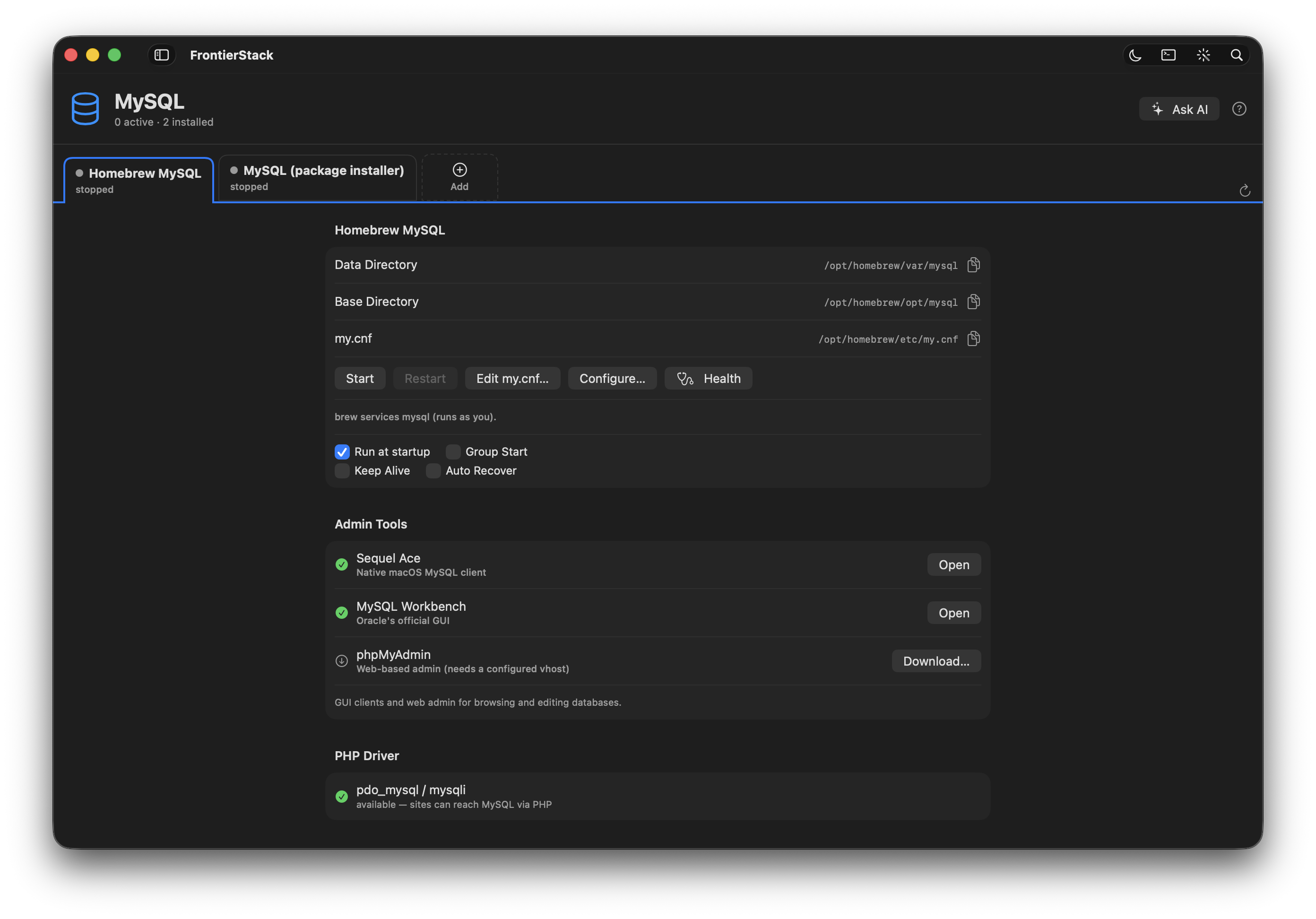
Open MySQL from the Databases section of the sidebar. The pane installs the server through Homebrew if it isn't present, then gives you the controls Server.app used to: Start, Stop and a live status light, the listening port (default 3306), and a list of the databases on the server. MariaDB — the drop-in MySQL-compatible fork — is managed the same way; the pane recognises whichever is installed.
Local development follows one deliberate convention: the local root account has no password. This is the MAMP/XAMPP norm and it is what makes one-click setup and the AI's SQL tools work without a credential prompt. It is safe precisely because MySQL on your Mac listens only on 127.0.0.1 and is reachable only from the machine itself. The moment a database needs to be reached from elsewhere — a passworded account, or a database on a linked server — you switch to the secret vault, described below.
root applies only to MySQL bound to localhost on the Mac in front of you. It is a development convenience, not a recommendation for any server that accepts connections from the network. Production databases get a real password and live in the vault.5.2Database Ops and running SQL
The Database Ops pane is where databases stop being a black box. Its Replication section detects whether a configured server is a MySQL replica or a PostgreSQL standby and shows the lag: MySQL reads SHOW REPLICA STATUS (IO and SQL threads, Seconds_Behind_Source); PostgreSQL uses pg_is_in_recovery() and the replay timestamp. Stopped replication, or lag past your threshold, raises an alert on your channels — the basis of the Database Slave monitoring preset.
For inspecting or fixing data, the AI Administrator carries a run_sql tool. Ask it in plain language — "why are these orders showing the wrong total?", "delete the duplicate users older than the originals" — and it runs SQL against the local server and shows you the result as a table, much like MAMP's Claude integration. Because statements can modify data, run_sql requires changes enabled; read-only queries work the moment the assistant is on. It defaults to local root with no password and is local-only by design.
5.3Passworded and remote databases
The local-root shortcut stops exactly where the network begins. For a database that needs a password, or one on a remote or linked server, you never paste the password into a prompt or a tool. Instead you add it once to the AI Administrator's Script secrets (.env) bar as a named secret — DB_PASSWORD or MYSQL_PWD — and the assistant runs the mysql client through run_script, referencing the value as $DB_PASSWORD and running it over SSH against the named server. The real value stays on your Mac and is injected at run time; the cloud model sees the name, never the secret.
.env vault and reference it as $NAME. The value is injected locally or over SSH at run time and is never sent to the AI. This is the same vault model used throughout FrontierStack — see Chapter 13.5.4PostgreSQL
Open Postgres for projects that want advanced SQL, rich JSON, full-text search or GIS. The pane installs and runs PostgreSQL (default port 5432) and sits alongside MySQL with the same start/stop/status controls. Choose PostgreSQL when your application or framework expects it; otherwise MySQL/MariaDB remains the easy default. Both engines are first-class targets for the backup jobs and AI tools described later, and PostgreSQL is the foundation for several of the specialised stores below — pgvector for embeddings, TimescaleDB for time-series, and PostgREST for an instant REST API over a Postgres database.
5.5Redis and other caches
Sessions, queues, rate limits and hot-path caching usually want an in-memory store rather than a relational table. FrontierStack runs the two standards from the Caching catalog: Redis (port 6379), the in-memory key-value store that also backs Redis Streams, and Memcached (port 11211) for a simple distributed cache. Install, start and monitor them like any other service. Most CMS and framework deployments pair Redis with MySQL or PostgreSQL; the Service Catalog (Chapter 6) lists every option.
5.6Vector and analytics databases
Two newer families of store get their own catalog categories. Vector databases hold embeddings for retrieval-augmented generation (RAG) and semantic search; they are how the AI stack (Chapter 15) gives a model access to your own documents. Analytics databases are columnar or time-series engines built for fast aggregation over large datasets rather than transactional reads and writes.
| Engine | Kind | Port |
|---|---|---|
| MySQL / MariaDB | Relational | 3306 |
| PostgreSQL | Relational | 5432 |
| Redis | In-memory cache / streams | 6379 |
| Memcached | In-memory cache | 11211 |
| Qdrant | Vector (RAG / embeddings) | 6333 |
| Chroma | Vector (embeddings) | 8000 |
| Weaviate | Vector (hybrid search) | 8080 |
| Milvus | Vector (distributed) | 19530 |
| pgvector | Vector (Postgres extension) | 5432 |
| ClickHouse | Columnar OLAP analytics | 8123 |
| InfluxDB | Time-series | 8086 |
| TimescaleDB | Time-series (Postgres ext.) | 5432 |
| Apache Druid | Real-time OLAP | 8888 |
For purely in-process vector search there is also FAISS (a library, no port). Pick the engine your framework expects; the panes install and run each one through the same catalog machinery.
pgvector keeps that inside an existing PostgreSQL; Qdrant, Chroma, Weaviate and Milvus are dedicated stores for larger collections.5.7Data pipelines & ETL
Moving and reshaping data between these stores is its own discipline. The Data Pipelines & ETL catalog category covers it at the overview level: Airbyte and Meltano for extract-load with hundreds of connectors, dbt for SQL-based transformation and modelling, and orchestrators such as Dagster, Prefect and Kestra for scheduling the work. These are full platforms; FrontierStack installs and runs them and surfaces their web UIs, but the pipeline logic lives in each tool. For programmatic data-pipeline DAGs there is also Apache Airflow in the Workflow Orchestration category.
5.8Backups: dumps, the overview pane, and CCC
A database with no tested backup is a future outage. FrontierStack approaches this from two directions. In Database Ops you define a verified dump schedule per server: name, engine (MySQL or PostgreSQL), host, port, user, database (blank = all) and a backup directory. Due jobs run automatically while the app is open, and Run Now triggers one immediately. Each run does more than dump — mysqldump runs with --single-transaction for a consistent InnoDB snapshot, then Verify checks gzip integrity and that the dump ends with its completion marker (catching truncated or half-written files), writes an .md5 sidecar, rotates to your keep count, and rsyncs the result offsite over key-based SSH.
The AI Administrator exposes the same operations as tools: db_dump dumps a database to a .sql file on the target (using mysqldump or pg_dump), and backup_now makes a timestamped tar.gz of configs, a site or a data folder. Both are mutating, so they require approval and changes enabled; for the DB password they reference a $NAME vault secret, never a pasted value.
The Backups overview pane rolls up every mechanism so staleness is obvious at a glance: Time Machine status, Carbon Copy Cloner tasks, app-managed Apache config snapshots, config version history in Git, and scheduled auto-exports. The Carbon Copy Cloner pane reads CCC's tasks and history through its ccc command-line tool and lets you Run a task on demand. Both Time Machine and CCC feed the Alerts engine — a backup that hasn't run within its threshold, or a failed CCC task, raises an alert on your channels (Chapter 11).
The app's own settings are covered as well. The sidebar's pins and hidden services, saved Setups and network Locations are kept in JSON files in the app's support folder rather than only in macOS preferences; every Git snapshot carries them together with a copy of the preferences, and an hourly shadow copy of the preferences means a wiped preferences file is put back automatically at the next launch. Restore App Settings… under Config version history restores them by hand from the latest snapshot.
5.9Restore — and restore safety
Backups exist to be restored, and restore is the dangerous half. The AI's restore tool extracts a .tar.gz archive or imports a .sql dump into a database. Because importing a dump overwrites the live database and extracting an archive overwrites files in place, restore is mutating and potentially destructive: it always requires explicit approval with changes enabled, and SQL imports reference the DB password as a $NAME vault secret.
.sql dump replaces the current contents of the target database, and there is no automatic undo. Before any restore, take a fresh dump of the current state (db_dump or Run Now) so you can roll back, and confirm you are pointed at the right database and the right server — not production by mistake.5.10Recovering a broken database
Sometimes a database is worse than down — it won't start, or a table is corrupt. FrontierStack gives the AI Administrator (Chapter 13) the same tools you would reach for by hand, behind the usual approval card. mysql_check_tables and pg_check_tables run mysqlcheck / pg_amcheck to find corrupt or crashed tables; with repair on they take a mysqldump/pg_dump backup first, then repair (--auto-repair / REINDEX), so a fix is reversible. mysql_service_control and pg_service_control start, stop, restart or check the server across systemd, launchd, Homebrew or service(8), local or over SSH.
For the hard cases there are guided skills — “Recover Broken MySQL” and “Recover Broken PostgreSQL” — that walk the whole runbook: read the error log, diagnose the fault, dump everything readable, rebuild into a fresh data directory, repair or recreate the damaged tables, and restart — always renaming the old data directory aside as a cold backup, never deleting it, and confirming before every destructive step. On a remote host, the fastest way in is the red Emergency button on the database's row in the server pane: it opens the assistant pre-loaded with the right recovery skill for that host.
5.11ORMs and app-native tooling: Drizzle and Convex
Finally, two tools meet your application where it defines its schema. The Drizzle ORM pane detects a Drizzle project (its tables, migrations and backend dialect) and runs drizzle-kit tasks for you — Generate SQL from your schema, Migrate, Push the schema directly, Pull (introspect) an existing database, and open Drizzle Studio to browse data. The Convex pane manages Convex, a reactive backend with a built-in database: run npx convex dev to watch and push functions, or stand up a self-hosted backend in Docker. Both need Node.js, which the panes will install via Homebrew if it is missing. These cover the application's own data layer; the dumps and backups above still protect whatever they write underneath.
FrontierStack User Manual · Version 1.0.0 · Chapter 5